



AI Parts Catalog
AI for every parts decision across your service supply chain
Every part's data correct and in one place.
-
Data and catalogs
Parts Catalog Compiler
Builds interactive parts catalogs from 3D models and BOMs
Read the full use case+What it doesCatalog authoring is manual and spread across disconnected tools, so each model release takes dozens of hours. The compiler builds the interactive catalog from 3D models and BOMs, links every part to its documents and makes it searchable.
+Works from- 3D models
- BOMs
- Procedures
- Documents
+Features- Ingests 3D models and bills of materials, then matches each part to its BOM entry.
- Generates the assembly hierarchy and creates clickable hotspots on each view.
- Links parts to procedures and documents, with semantic and serial-number search.
- Runs coverage and naming checks, publishes the catalog and routes exceptions to experts.
-
Data and catalogs
Unified Part Record
One record per part, built from drawings, specs, BOMs and ERP data, with every value traced to its source
+What it doesPart data is spread across drawings, spec sheets, eBOMs, PLM and ERP material masters, so no one can check which value is right. The AI builds one page per part and links every value to its source text.
+Works from- Drawings
- Spec sheets
- BOMs
- ERP
+Features- Ingests drawings, spec sheets, catalogs, eBOMs, PLM data and ERP material masters.
- Extracts part numbers, revisions, materials, dimensions, tolerances and quality requirements from each document.
- Links each value to the exact text it came from and flags conflicts between sources.
- Publishes one page per part with cross-tier part numbers, specs, notes and supply status.
-
Data and catalogs
Part Convergence
Finds duplicate parts and parts that do the same job, and consolidates them into one
+What it doesThe same part is often stocked under several numbers, and parts that do the same job are planned and held separately. The AI finds those parts and proposes one number to keep for each group.
+Works from- Parts catalog
- Drawings
- Spec sheets
+Features- Compares parts across the catalog by drawing, specification and description to find near-identical parts.
- Sorts each match into the same part, a part that does the same job or a look-alike.
- Proposes one part number to keep per group, with the differences shown side by side.
- Routes each proposal to engineering for approval, then records interchangeable parts under one leading number.
Know which part it is from any input.
-
Identification and lookup
Parts Identification from Photos
Identifies a part from a photo, even when its label is worn
Read the full use case+What it doesTechnicians and warehouse staff spend 10 to 20 minutes per part cross-referencing catalogs, manuals and systems, and worn parts are often missed. The AI identifies the part from a photo and matches it to the correct SKU.
+Works from- Photos
- Parts catalog
- ERP
- Field service
+Features- Takes photos from mobile apps, field service systems, email or cloud storage and cleans up each image.
- Reads visible text and markings, and identifies the manufacturer and model from logos.
- Matches the part against the catalog, validates specifications and dimensions, and checks supersession chains.
- Writes matched SKUs to ERP, field service and inventory systems, routing low-confidence matches to specialists.
-
Identification and lookup
Parts Portal
Look up any part by number, model or plain description
+What it doesAgents and technicians dig through parts lists model by model, and a superseded or renumbered part often returns nothing. The portal finds the part from a number, model or plain description and shows which parts fit the unit.
+Works from- Parts catalog
- BOMs
- Manuals
+Features- Takes a part number, model, serial number or plain-language description as the search.
- Narrows results to the parts that apply to that unit by serial number.
- Follows supersessions so an old or kit number still finds the current part.
- Shows supply status for each part and answers follow-up questions from service documentation.
-
Identification and lookup
Parts Identification from Blueprints
Matches a part to its engineering drawing and extracts its dimensions, tolerances and materials
Read the full use case+What it doesEngineers review hundreds of drawings a day across CAD viewers, PLM, PDM and ERP, at 15 to 20 minutes each. The AI reads each drawing and matches a part image or description to the right part.
+Works from- Drawings
- PLM
- PDM
- ERP
+Features- Reads each new drawing, detects the template and parses title blocks, tables and views.
- Extracts dimensions, tolerances, GD&T symbols and materials, then identifies mechanical parts.
- Matches a part image and description against drawings, returning ranked results with the match highlighted.
- Flags ambiguous matches with alternatives and learns from each user selection.
-
Identification and lookup
Alternate Parts
Finds a part that fits when the original is obsolete, superseded or unavailable
+What it doesWhen a part is obsolete or out of stock, engineers check by hand which part can replace it. The AI follows supersessions and finds similar parts by function, then ranks the ones that fit and are in stock.
+Works from- Supersession files
- BOMs
- Drawings
- Inventory
+Features- Reads supersession records and links each old part number to the part that replaced it.
- Finds parts that share subsystem, function and operating conditions through the service ontology.
- Compares candidates on form, fit and function and ranks them by how closely they match.
- Checks stock and returns the best in-stock alternate with its differences from the original.
The right part on the job, first time.
-
Dispatch and repair
Service Parts Prediction
Predicts the parts a job needs before the technician is dispatched
Read the full use case+What it doesTechnicians often arrive without the right parts because symptoms are described differently across manuals, legacy systems and notes. The AI predicts the parts a job needs and builds a ranked picklist before dispatch.
+Works from- Work orders
- Service history
- Parts catalog
- Inventory
+Features- Normalizes free-text symptoms across thousands of prior service events
- Ranks probable parts by equipment model, failure history and catalog
- Checks live inventory, applies warranty and safety gates
- Delivers a ranked picklist in under two minutes
-
Dispatch and repair
Parts Triage
Diagnoses the fault on a call and pinpoints the failed part in the parts book
+What it doesAgents hop between CRM, ERP, knowledge bases and RMA portals, and a typical case takes 10 to 20 minutes. The AI diagnoses the fault from the conversation and highlights the likely failed part in the parts book.
+Works from- Manuals
- Ticket history
- Parts books
- Call logs
+Features- Reads the caller's description, extracts model and serial number and normalizes the device data.
- Runs a probabilistic diagnosis against known patterns and guides the agent through the next steps.
- Opens the unit's parts book at the right page and highlights the likely failed part.
- Checks the part's availability, books a visit if needed and updates the case records.
-
Dispatch and repair
Repair vs Replace
Recommends repair or replacement for each unit, based on cost, lead time and policy
Read the full use case+What it doesAgents jump between CRM, ERP, parts portals and ecommerce sites to check repair costs, lead times and policies, taking 20 to 45 minutes per decision. The AI compares repair and replacement and recommends one with its rationale.
+Works from- CRM
- ERP
- Service history
- Warranty policy
+Features- Reads the CRM case, identifies the product and serial, then retrieves service history, warranty and policy context.
- Checks parts pricing, stock and lead times, then predicts repair cost and turnaround.
- Compares repair scenarios with compatible replacements using age, warranty, travel, availability and customer context.
- Presents the recommendation and rationale, then creates the service job or replacement order and updates records.
The right stock, in the right place.
-
Forecasting and replenishment
Service Parts Demand Forecasting
Forecasts demand for every part at every location, including parts with little history
Read the full use case+What it doesPlanners forecast thousands of SKUs across regions and stocking locations from fragmented ERP reports and spreadsheets. The AI produces a 52-week forecast for every part at every location and turns it into stock targets.
+Works from- Consumption
- Install base
- Service tickets
- Warranty claims
+Features- Learns from consumption, install base, service tickets, failure codes, warranty claims, lead times and supersession links.
- Backtests models by SKU and location, then selects or combines the best performers.
- Produces 52-week forecasts with prediction intervals, including cold-start parts and supersession chains.
- Calculates safety stock and reorder points, writes a buy plan to ERP and alerts planners to exceptions.
-
Forecasting and replenishment
Predictive Inventory Planning
Predicts where failures will happen and sets the stock each depot should hold
+What it doesStock split by installed-base counts treats every depot alike, though one may serve older equipment working harder in a harsher climate. The AI forecasts demand for each part at each depot and sets the stock each should hold.
+Works from- Installed base
- Service history
- Warranty claims
- Quality data
+Features- Finds similar parts through the service ontology to fill in thin history at each depot.
- Estimates each part's failure risk from the equipment it sits in and how that equipment is used.
- Adds early signals such as quality events, warranty claims, technician notes and forward bookings.
- Reconciles depot and network forecasts, then writes safety stock, reorder points and locations to planning.
-
Forecasting and replenishment
Predictive Parts Replenishment
Keeps every hub and depot at its stock target, triggering reorders and transfers automatically
+What it doesStocking recommendations need a planner to act on each one before anything changes in the planning system. The AI sets each hub and depot's stock target, then reorders, transfers and corrects stock as service levels change.
+Works from- ERP
- Forecasts
- Stock levels
- KPIs
+Features- Classifies each SKU by demand pattern and business impact and assigns a strategy per SKU and location.
- Sets safety stock at hubs and target stock at distribution centers, tested with what-if simulations.
- Triggers reorders and transfers and writes the decisions back into the planning system.
- Monitors KPIs continuously, makes short-term corrections when they slip and flags long-term changes.
-
Forecasting and replenishment
Parts Ordering Agent
Answers "where's my part?" and "is it in stock?" automatically
+What it doesEach "where's my part?" or "is it in stock?" email takes 15 to 20 minutes as agents check ERP, order portals and carrier sites. The agent assembles the answer from those systems and replies, passing only complex cases to people.
+Works from- ERP
- Order portals
- Carrier sites
+Features- Reads each incoming email, removes duplicates and classifies the request type.
- Extracts part numbers, order numbers and account details, then checks entitlement and policy.
- Checks stock, order status and shipment tracking across ERP, order portals and carrier sites.
- Drafts and sends the reply, updates ERP and CRM and routes low-confidence cases to a person.
Know which parts will fail, and why.
-
Reliability and warranty
Remaining Useful Life Prediction
Predicts when a component will fail so its replacement is ready in time
Read the full use case+What it doesCalendar-based maintenance ignores actual operating stress, so parts are replaced too early or fail without warning. The AI estimates each component’s remaining life and has the replacement part reserved in time.
+Works from- Telemetry
- Maintenance records
- ERP
- Life curves
+Features- Trains on telemetry, maintenance and ERP records, supplier life curves and the equipment ontology.
- Computes a health index for each component and estimates its remaining useful life.
- Applies policy rules for lead-time risk, warranty coverage and SLA priority.
- Creates work orders, reserves parts for just-in-time replacement and schedules the maintenance window.
-
Reliability and warranty
Part Suitability Prediction
Predicts whether a part will qualify and last at the site it is going to
+What it doesOften the only check before a part ships is the supplier's certificate, which ignores how the part is used at each site. The AI predicts whether the part will qualify and how long it will last there.
+Works from- Supplier certificates
- Lot data
- Service history
- Site conditions
+Features- Reads supplier certificates and manufacturing lot data for each part before it ships.
- Links each supplier and lot to field failures and warranty claims for the same part.
- Compares the destination site's equipment and operating conditions with where past parts failed.
- Predicts whether the part will pass qualification and how long it will last, flagging risky lots.
-
Reliability and warranty
Parts Failure Analysis
Flags parts failing earlier than they should and traces them to a supplier, batch or order
+What it doesParts from different suppliers and lots fail at different rates under one part number, and planning treats them as identical. The AI flags parts failing before their median life and traces them to a supplier, batch or order.
+Works from- Service history
- Warranty claims
- Supplier data
- Purchase orders
+Features- Builds each unit's part history by serial number from service tickets and warranty claims.
- Compares each part's failure age with its median life and flags parts failing early.
- Groups early failures by supplier, production batch and purchase order to find the common source.
- Maps units at risk by region and feeds the early warnings into parts forecasts.
-
Reliability and warranty
Warranty Returns Classification
Inspects each returned part to decide whether it failed or was mistreated, and whether warranty covers it
+What it doesEach warranty return needs manual classification across hundreds of parameters, and the patterns never reach demand planning. The AI inspects each returned part from images and data, decides whether it failed or was mistreated and feeds the patterns into forecasting.
+Works from- Images
- Serial numbers
- Firmware versions
- Operating data
+Features- Captures images and records for each returned part, including serial number and firmware version.
- Inspects the images for damage and misuse and matches the data to known failure signatures.
- Classifies the return as a genuine failure or mistreatment and checks it against warranty terms.
- Feeds failure patterns into demand forecasting as an early signal.
Related articles

From 50% to 90%+ Forecast Accuracy
What changes when intermittent demand meets expanded signal and full-scale modeling.
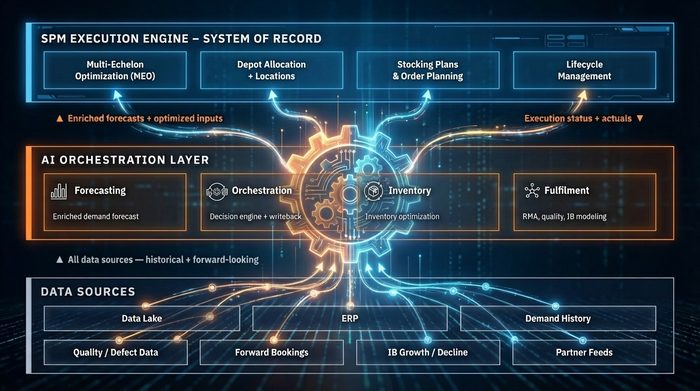
The Four Structural Gaps in Modern SPM Systems
Signal, scale, integration and execution: why each one compounds the others.

Spare Parts Depot Stocking
Forecasting each part at each depot from the equipment it serves.