
Your agents waste hours correlating BMC alerts with customer tickets—there's a faster way to route cases and reduce handle time.
Bruviti deployment data shows automated email workflows recover more than 300 agent hours per week at under 2 minute median handling time. Operators automate the repetitive ticket flow so agents spend their week on data center support cases that actually require a human, not on routine replies.
Agents can't quickly parse BMC logs or IPMI telemetry when they arrive as email attachments. Each server incident requires manual log review, slowing diagnosis and increasing average handle time.
Support teams manually categorize incoming tickets as compute, storage, power, or cooling issues. Misrouted cases bounce between teams, frustrating customers and wasting agent time.
Data center customers ask the same questions about drive replacements, thermal alerts, and firmware updates. Agents answer these manually instead of focusing on complex escalations.
Bruviti's platform automates the entire support workflow from case creation through resolution. When a customer submits a ticket or BMC telemetry arrives, AI immediately classifies the issue type, correlates it with historical failures, and routes it to the appropriate team—power, cooling, compute, or storage. Agents see pre-populated case notes and diagnostic context instead of blank forms.
For routine inquiries like drive replacement procedures or thermal alert thresholds, the system autonomously drafts responses using your knowledge base and past resolutions. Agents simply review and approve. Complex cases receive enriched routing data—RAID configuration, PUE metrics, affected server models—so the specialist team has full context before they even open the ticket.
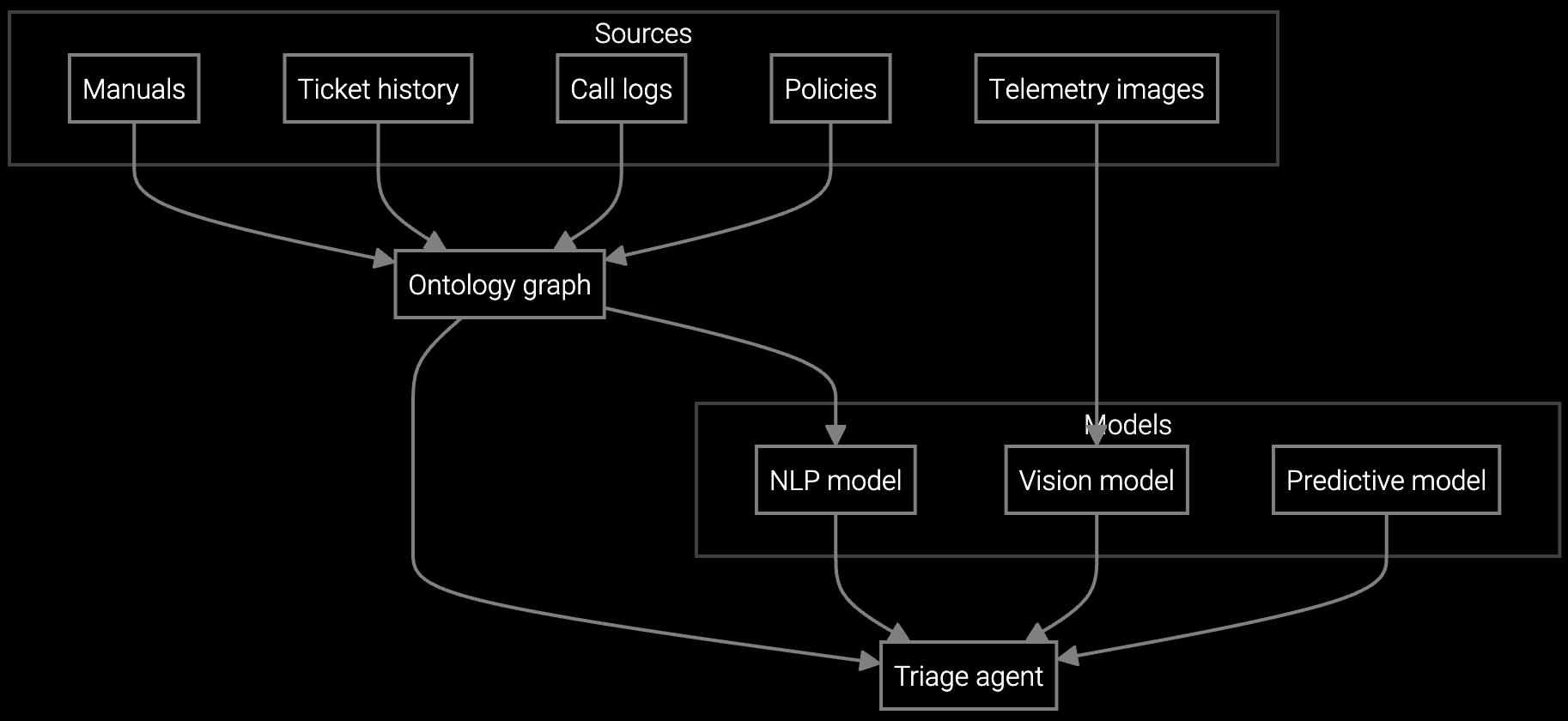
Autonomous case classification analyzes BMC telemetry, server symptoms, and IPMI logs to route data center incidents to compute, power, cooling, or storage teams with full diagnostic context.
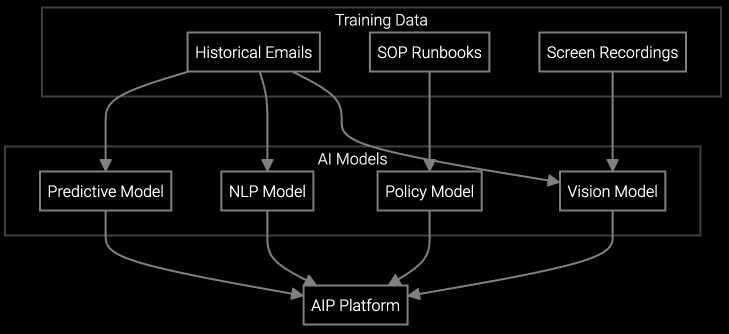
AI reads and classifies inbound emails about drive failures, thermal alerts, and firmware updates—drafting responses from your knowledge base and historical resolutions for agent review.
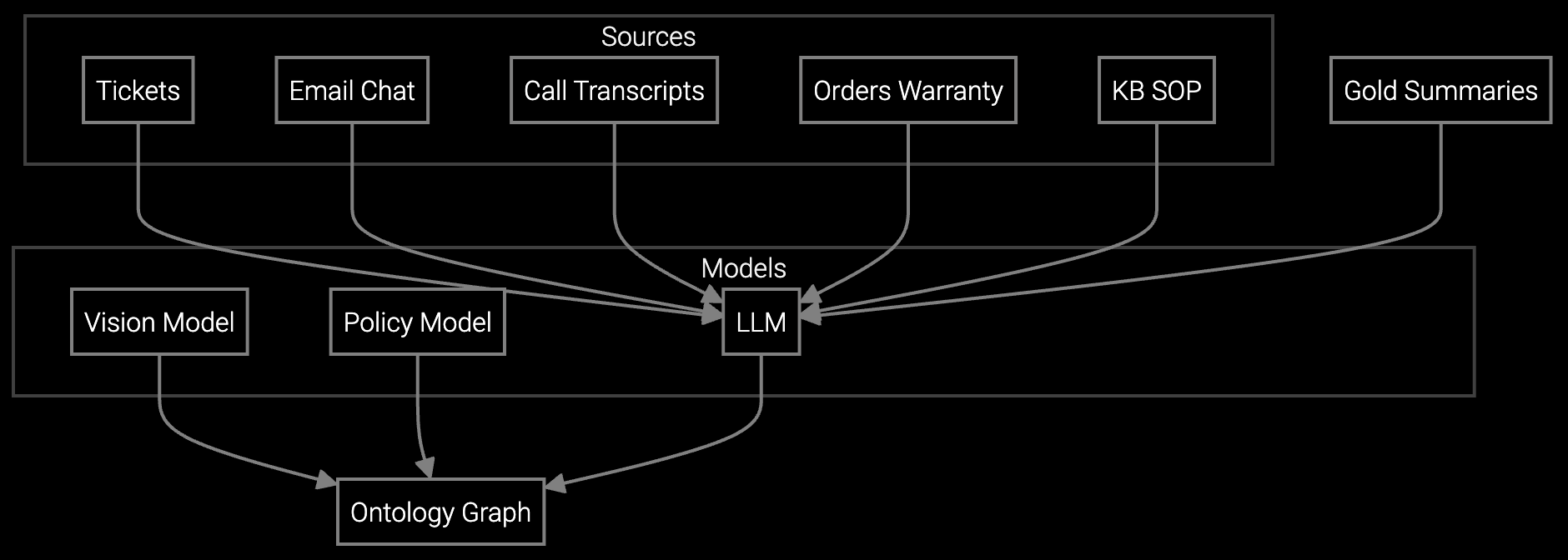
Instantly generates case summaries from email threads, chat logs, and call transcripts—giving agents full history of power, cooling, and server incidents without reading 20 messages.
Data center OEMs face unique support complexity. A single customer deployment might include 50,000 servers across multiple geographies, generating thousands of BMC alerts daily. Manual triage can't keep up—agents need automated correlation between IPMI events, historical failure patterns, and current ticket context.
The platform ingests BMC telemetry streams, RAID status alerts, thermal sensor data, and power events. It identifies patterns invisible to individual agents: a power supply batch with early failure rates, thermal hotspots correlated with specific rack configurations, or drive models showing predictive SMART degradation. This context flows directly into case routing, so specialists see root cause hypotheses before they touch the ticket.
The platform normalizes IPMI logs, SNMP traps, and BMC alert emails into a unified schema. It extracts temperature readings, fan RPM, power draw, and error codes regardless of vendor-specific formatting, then correlates these signals with case symptoms to surface relevant diagnostics.
Routine inquiries like drive replacement procedures, firmware update instructions, and thermal threshold explanations can be answered autonomously—typically 50-60% of inbound volume. Complex escalations involving RMA decisions, root cause analysis, or SLA exceptions still require agent validation.
AI classifies cases by analyzing symptom keywords, attached telemetry, and historical resolution patterns. A cooling-related thermal alert routes to HVAC specialists with pre-populated rack location and PUE context. A RAID degradation alert routes to storage engineers with drive model and failure history—eliminating misrouted tickets that bounce between teams.
Yes. Every auto-classified ticket displays confidence scores and reasoning. Agents can reclassify with a single click, and the system learns from these corrections to improve future routing accuracy. Human judgment always overrides automation.
Initial integration with your CRM and BMC feeds typically takes 2-4 weeks. Most teams run a pilot on drive replacement cases first to validate accuracy, then expand to thermal alerts, power events, and storage incidents over the following 60 days.

Understanding and optimizing the issue resolution curve.

Part 1: The transformation of IT support with AI.
Part 2: Implementing AI in IT support.
See how Bruviti eliminates swivel-chair work and gets your team through the queue faster.
Schedule Demo