Manual log parsing and fragmented remote tools cost network OEMs 3-5 hours per escalated incident and delay MTTR targets.
An automated network remote support workflow auto-triages 70% or more of incidents and resolves 50% or more at L1/L2, per Bruviti deployment data. Builders chain intake, classification, root-cause suggestion, and resolution into one pipeline so routine incidents flow without human routing. Engineers handle only the exceptions the workflow flags for judgment.
Support engineers spend hours manually parsing syslog, SNMP traps, and error counters from routers and switches. Pattern recognition relies on individual experience rather than automated analysis, creating inconsistent diagnostics and extending session duration.
Remote access platforms, CRM systems, and telemetry tools operate in silos. Engineers manually copy context between systems, leading to incomplete handoffs when escalating to specialists or logging resolved cases for future reference.
Troubleshooting steps for firmware issues, configuration errors, or hardware failures exist in senior engineers' heads rather than in executable workflows. Junior engineers escalate prematurely due to missing playbooks, inflating escalation rates.
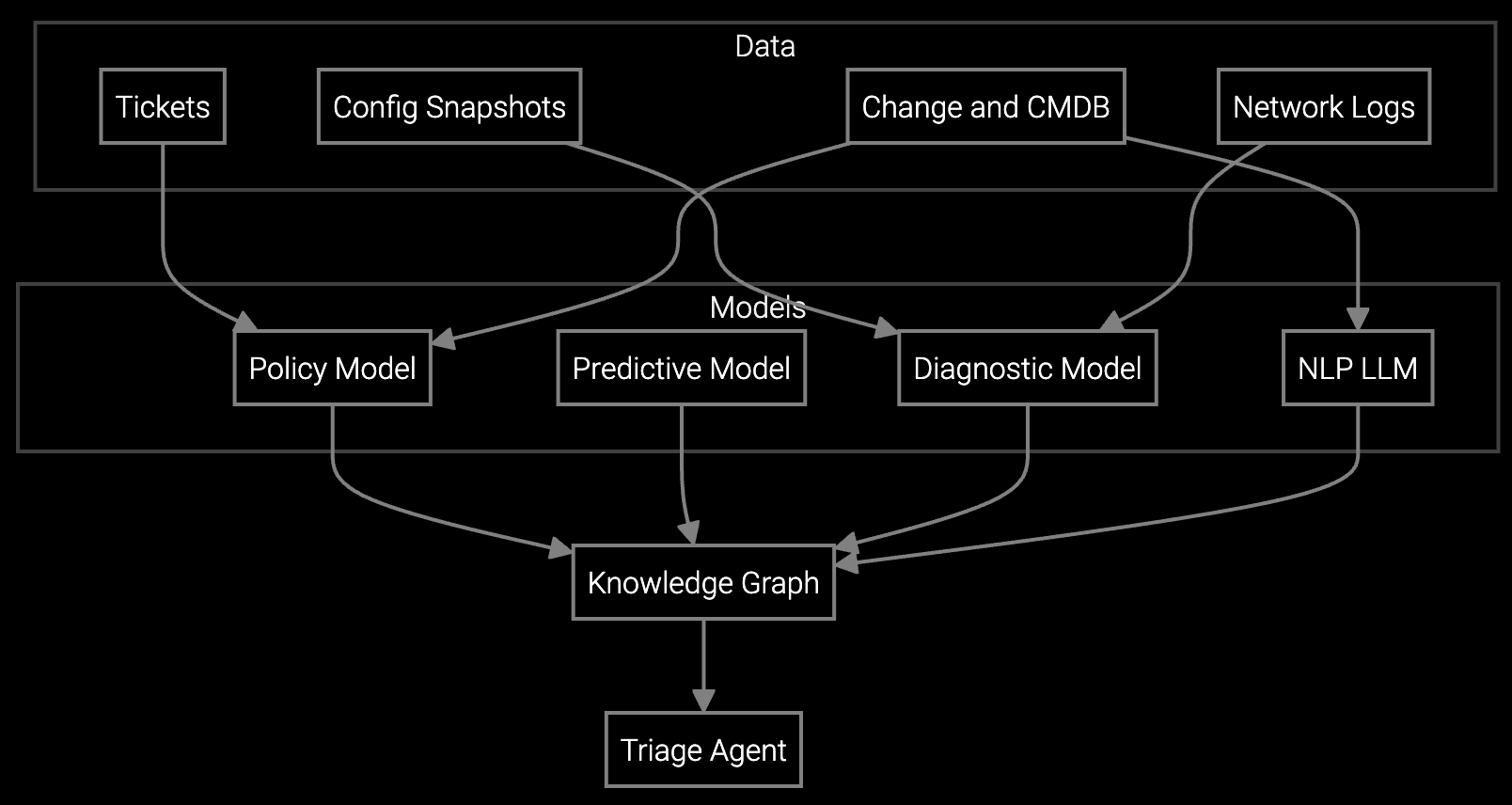
Bruviti provides REST APIs and Python SDKs that integrate directly into existing remote support stacks. Telemetry ingestion endpoints parse SNMP traps, syslog streams, and device CLI output in real time, feeding structured data into your remote access platform. Log analysis runs as an API call that returns root cause hypotheses with confidence scores, allowing engineers to validate findings rather than manually grep through thousands of lines.
The platform operates headless—your engineers continue using familiar tools while workflows execute automated analysis steps in the background. You control escalation thresholds via configuration files, define custom troubleshooting sequences using YAML, and trigger remediation scripts through webhooks. Data stays in your infrastructure; the platform processes telemetry without requiring uploads to external storage. This architecture eliminates vendor lock-in while automating repetitive workflow steps.
Network equipment manufacturers handle remote support for enterprise customers requiring 99.999% uptime guarantees. Support engineers remotely diagnose router misconfigurations, firmware vulnerabilities, and hardware degradation across thousands of devices deployed in data centers, branch offices, and carrier networks. Workflow automation targets high-frequency scenarios like BGP convergence failures, SNMP trap floods, and PoE power budget errors where manual log analysis creates resolution delays.
Integration points include existing NOC platforms for telemetry ingestion, ServiceNow or Salesforce for case management, and remote access tools like SSH or proprietary device consoles. Automated workflows parse device configs to detect drift from baseline, correlate error logs across upstream and downstream devices to isolate fault domains, and suggest configuration rollbacks or firmware patches based on CVE databases and known issue patterns.
The platform operates headless via REST APIs and webhooks that plug into your current stack. Your engineers continue using familiar remote access platforms, NOC dashboards, and CRM systems. Automation runs in the background—ingesting telemetry, analyzing logs, and surfacing insights—without requiring new UIs or workflows. You maintain full control over which automation steps execute and which require human validation.
Telemetry processing occurs within your infrastructure boundaries. The platform ingests SNMP traps, syslogs, and CLI output via APIs but does not require uploads to external storage. You define data retention policies, control access permissions, and can run the analysis engine on-premises or in your private cloud. Parsed results flow back into your case management system via webhooks.
You define custom workflows using YAML configuration files that map device types to troubleshooting sequences. Python SDKs allow you to write parsers for proprietary CLI output or vendor-specific MIBs. The platform learns from your historical resolution data—closed cases, config changes that resolved issues, and known error patterns—to suggest workflow steps without hardcoding vendor-specific logic into the core engine.
Track remote resolution rate (percentage of cases closed without escalation), mean time to resolution for automated vs. manual workflows, and session duration reduction. Network OEMs typically see 40-60% decrease in manual log analysis time within 60 days, 25-35% reduction in escalation rates as guided workflows standardize troubleshooting, and 15-20% improvement in first-contact resolution rates.
Automated workflows include confidence thresholds that trigger human review. When log analysis detects ambiguous patterns or suggests high-risk actions like configuration rollbacks, the system halts and presents findings to a support engineer for validation. You configure escalation rules—such as automatic handoff to specialists when remote resolution attempts exceed defined time limits or when specific error codes appear.
Software stocks lost nearly $1 trillion in value despite strong quarters. AI represents a paradigm shift, not an incremental software improvement.
Function-scoped AI improves local efficiency but workflow-native AI changes cost-to-serve. The P&L impact lives in the workflow itself.

Five key shifts from deploying nearly 100 enterprise AI workflow solutions and the GTM changes required to win in 2026.
See how Bruviti's API-first platform integrates with your existing stack to reduce manual session time and improve resolution rates.
Schedule Technical Demo